technical
Building my own publishing stack
A build log on replacing a hosted CMS, an email tool and an analytics script with my own code on Astro, Cloudflare Pages and Postgres, including the parts that broke.
The old tonycletus.com was an EJS site on Netlify with Decap CMS bolted on and a single-page app doing the routing. Nothing about it was broken exactly. It was just four decisions I had made at four different times, none of which knew about the others.
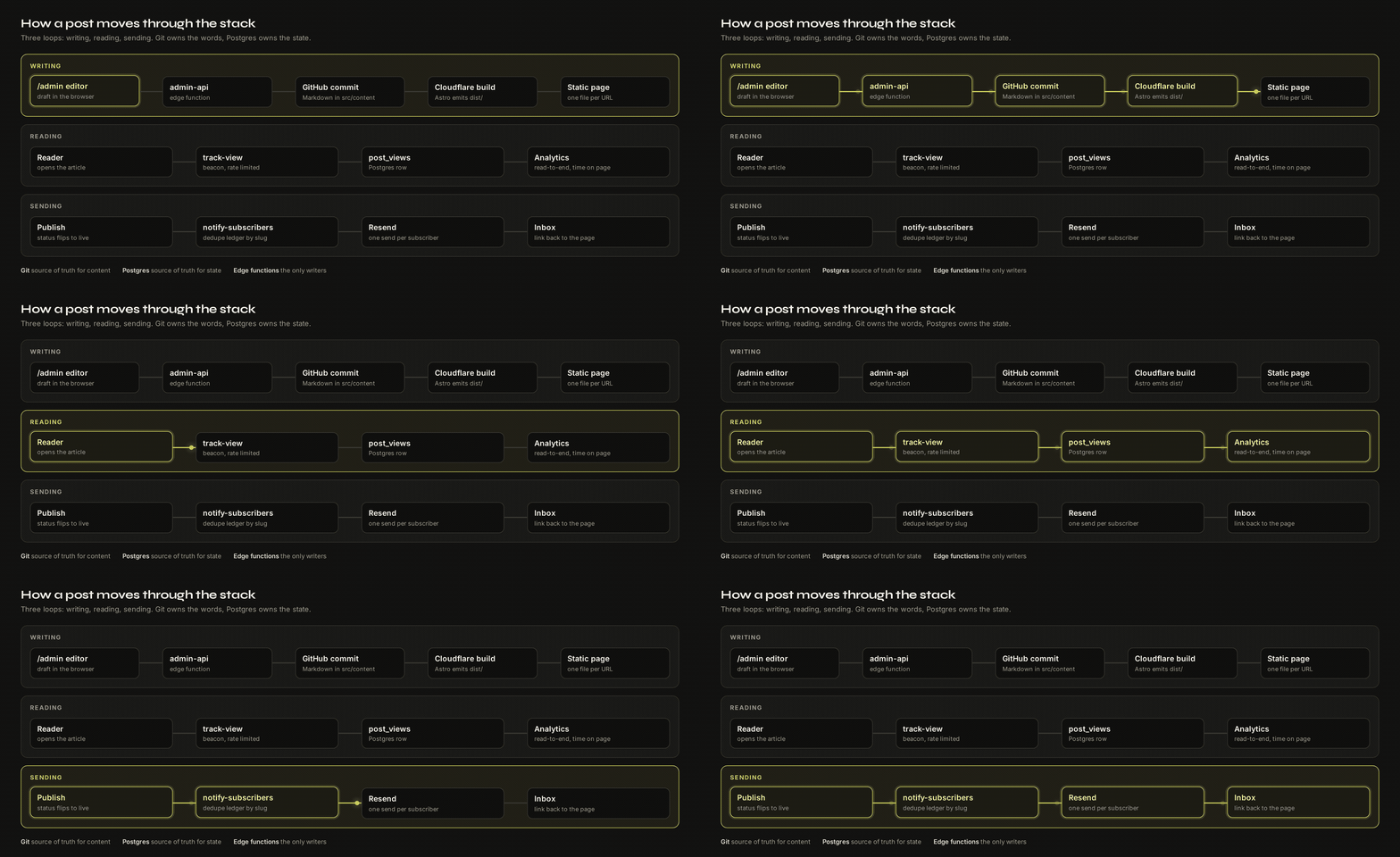
Today every article and product page is a static file built by Astro and served from Cloudflare Pages, sitting on top of a Postgres database, a handful of edge functions, and a CMS I wrote myself at /admin.
I rebuilt it twice before this version and threw both away. This is the build log for the third one, including the parts that went badly, because those are the parts that took the time.
The starting point
Four migrations, roughly in this order.
EJS to Astro. Templates that render on request to pages that exist as files. This is the change everything else depends on. Once the output is static HTML, hosting gets boring and fast, and boring hosting is the point.
SPA to static pages. The old routing shipped a JavaScript bundle to decide which of my articles to show you. Now every article is a file at a URL. Nothing to hydrate, nothing to wait for.
Decap CMS to my own. More on this below.
Netlify to Cloudflare Pages. The build itself was easy since Astro just emits dist/. The work was in the one serverless function I had, which pulled my recent GitHub pushes to order the projects page. Netlify’s Netlify.env.get() and handler signature became Cloudflare’s onRequestGet({ env }) reading env.GITHUB_TOKEN. Then the Netlify config, redirects and docs all had to go, which I did in a second pass because leaving both sets of config around is how you end up debugging a deploy that is running from a file you forgot existed.
Why replace the CMS at all
The honest reason is that I write about owning your tools and I did not own mine. The practical reason is narrower: the three services I rented were each answering a slightly wrong question, and none of them talked to each other.
The CMS did not know when a post went live, so the newsletter never fired from a publish. The email tool did not know which posts existed, so I pasted URLs by hand. The analytics script counted pageviews, which is the least interesting number available. A pageview says a browser opened a URL. It does not say whether the person finished reading.
Three tools, three mental models, and a manual step joining each pair.
The CMS
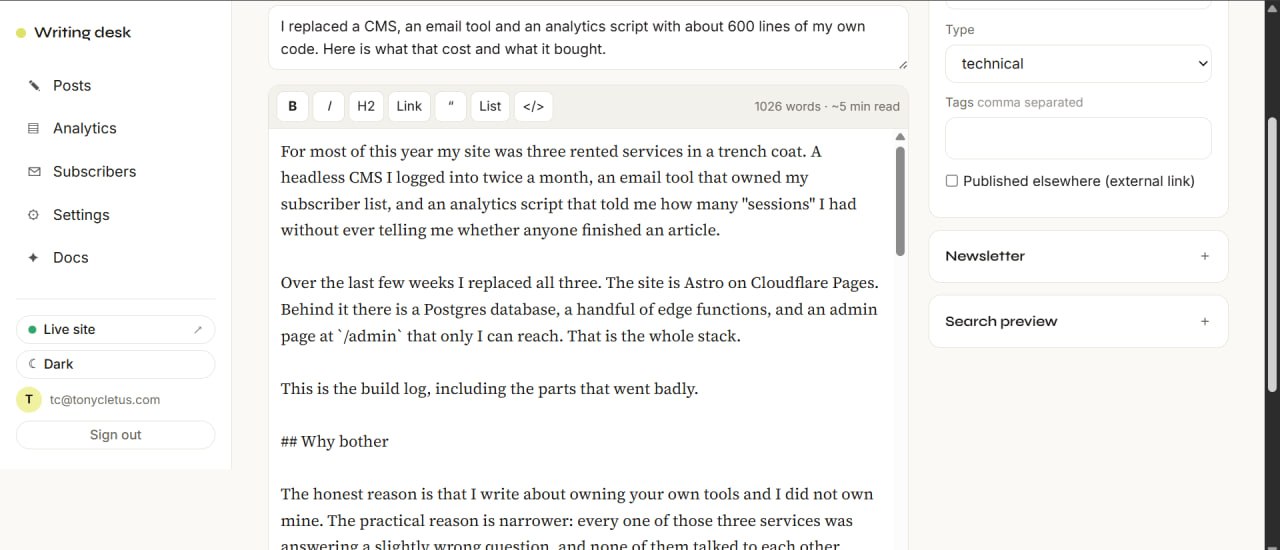
/admin is one Astro page with a sidebar and five views: Posts, Editor, Analytics, Subscribers, Docs.
The design decision that made the rest work was picking a direction for truth. Content lives as Markdown in src/content/articles and Git owns it. State lives in a posts table and the database owns that. Publishing from the admin writes the Markdown file to GitHub through an edge function, which pushes a commit, which triggers a Cloudflare build. Drafts never touch Git at all; they sit in the database as status: draft until the first publish.
Two things I got wrong here.
The token was in the browser. The first version had a GitHub personal access token in the client so the admin page could commit directly. It worked on the first try, which is usually the warning sign. A token in the browser is a token anyone with the browser can read. The write moved behind a server function and the client now sends a request instead of a credential.
The posts list said zero. For about a week the Posts view showed “0 total” and I kept looking at the query. The query was fine. The database was empty, because everything I had ever written existed only as files in the repo and nothing had ever inserted a row. The fix was an import that walks the articles directory and backfills one row per file. Obvious in hindsight, and a good example of a bug where the symptom points at the wrong layer.
The editor is the part I actually use
Everything above is plumbing. The editor is where the hours go, so it kept getting changes long after the rest had settled.
It started as a bare textarea over Markdown. That was fine until the day I added a screenshot and had no idea what it would look like until the build finished, which is a two minute round trip for a question that should take no time at all. So the editor grew a live preview pane that renders with the exact stylesheet the published article uses, not an approximation of it.
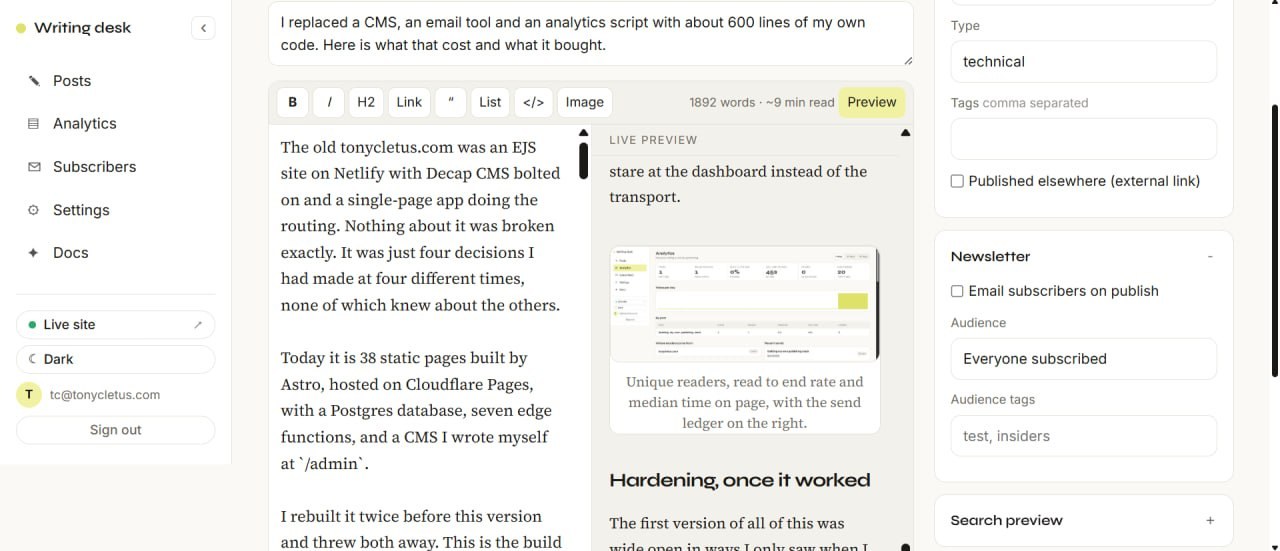
That parity is the whole point and it is easy to get wrong. A preview built from its own CSS is worse than no preview, because it teaches you to trust something that lies. The preview pane imports the same global styles as the article layout, so when I constrained figures to the text measure site wide, the editor inherited it without a second change.
Images were the other rough edge. The first version asked for a path with a browser prompt(), which is about as much help as a blank sheet of paper. Now there is a dialog that takes an upload, puts the file in a storage bucket that only my admin role can write to, fills the path back in, and asks for the alt text and caption in the same breath so I cannot skip them.
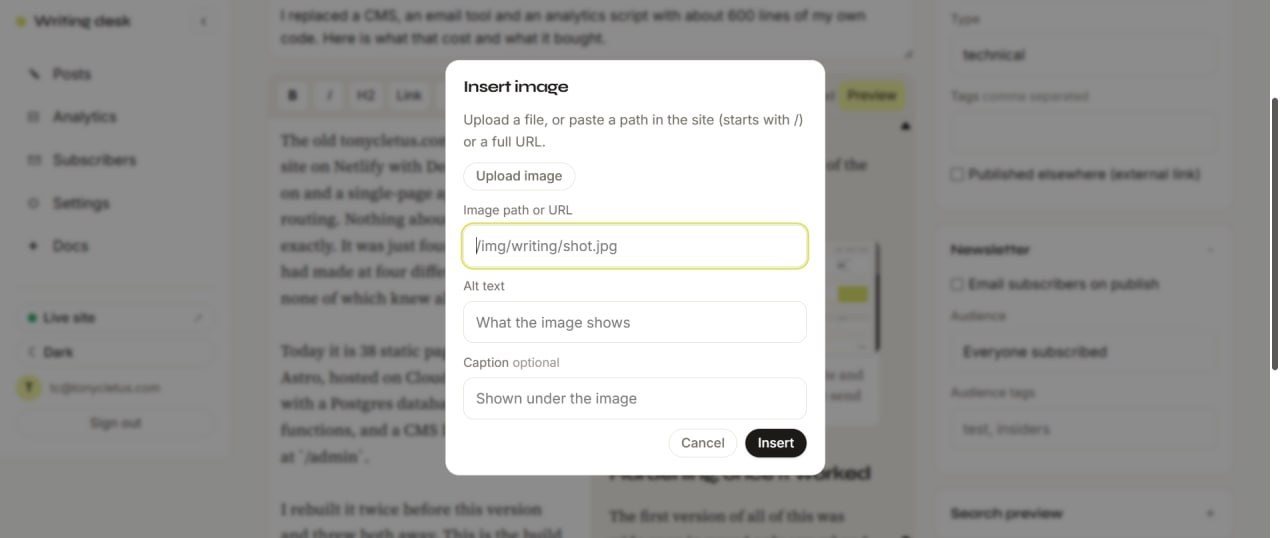
Sizing is handled for me, which is the line in that dialog I am most pleased with. Whatever the original dimensions, the figure lands at the text measure, keeps its aspect ratio, pans horizontally on narrow screens if it is a wide screenshot, and opens full resolution on click. I never think about it while writing.
One more thing the editor needed: a “pull from GitHub” button. Because Git owns the words and the database owns the state, a row can drift from the file if I edit the Markdown directly in the repo. Rather than pretend that never happens, the editor can resync a post from its file on demand.
The newsletter
Subscribers are a table. Delivery is Resend, called from an edge function, and it is the one piece I did not build. Getting mail into an inbox is a reputation problem and reputation takes years of sending from the same domain. I am fine renting that.
The interesting work was everything around the send.
Double opt in. The first version inserted an address and started sending immediately, which means anyone can subscribe anyone. Now a new address lands as pending with a token and only becomes subscribed after the person clicks a confirmation link. A confirmed address never gets re-mailed a confirmation, which closes the hole where someone could have my domain repeatedly email a stranger.
A send ledger. There is a newsletter_sends table with a unique index on the post slug. Before any send, the function claims the slug. If the claim fails, that post already went out and the function exits. This matters because there are two triggers: publishing from admin, and a GitHub Action that fires on a push to the articles folder. Two paths to the same action means you will eventually mail your list twice unless something stops the second one. The unique index is that something.

A useful consequence: because the ledger is in the database and not in Git, deleting an article file and re-adding it later does not re-send. I checked this on this very article, which went out to 20 subscribers before I pulled it back to rewrite it. The ledger row still says complete, so republishing is silent.
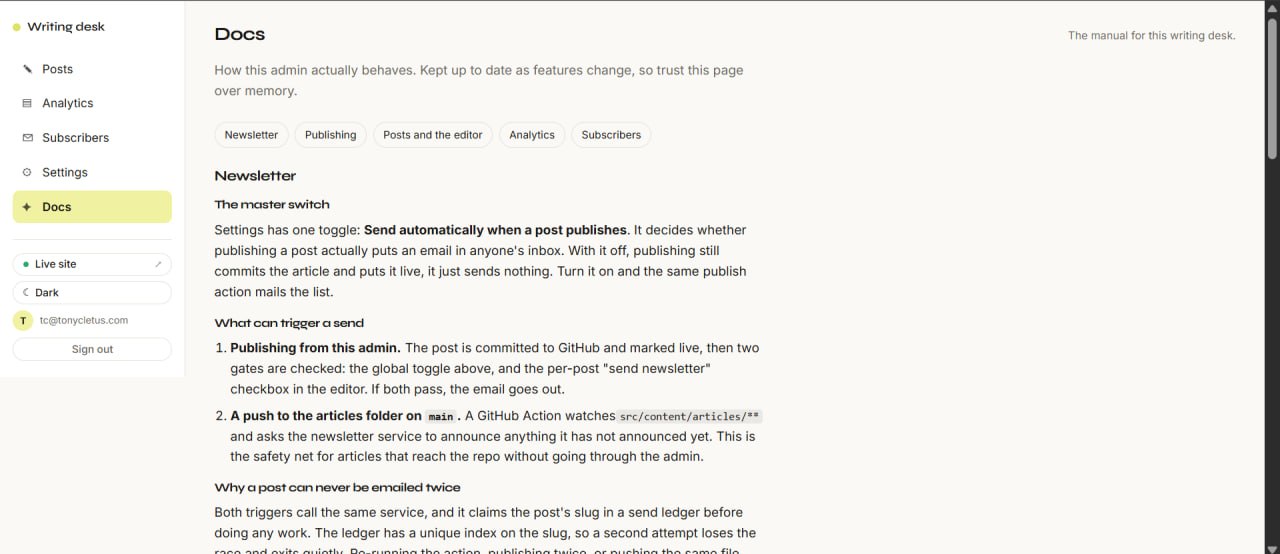
Dead letters. The first ledger had a boolean. A send that failed halfway through still closed the row, so the recipients after the failure got nothing and nobody found out. Now the row carries a status of complete, partial or failed plus the list of addresses that bounced out of the batch, and a retry resumes against only those addresses. complete is only reachable when the failure list is empty.
Dry run. The editor can run the whole pipeline, resolve the audience and report the recipient count without sending anything. I use it every time.
Analytics
This is the piece I wanted most.
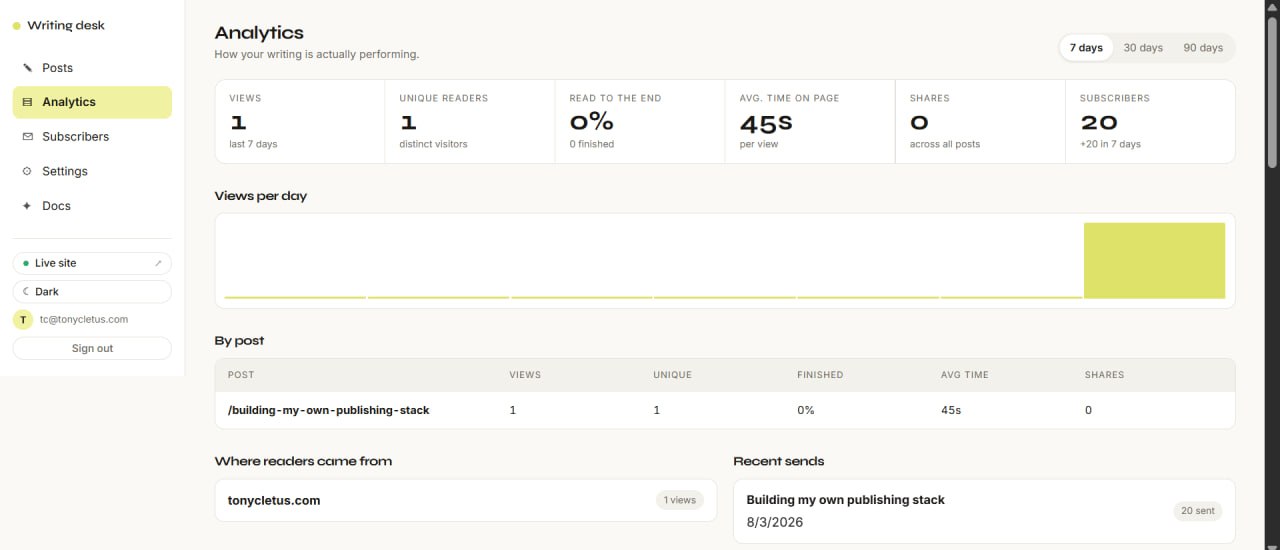
A small script on each article sends a beacon with time on page and a flag for whether the reader reached the bottom. No cookies. The session id lives in sessionStorage and dies with the tab, and the visitor identifier is a hash whose only job is telling two people apart from one person reading twice.
The numbers I look at now are unique readers, read to end rate, and median time on page. Pageviews are still recorded because they cost nothing, but I stopped looking at them.
Two bugs here, and they were the same bug wearing different clothes. First, the tracking functions were written but never deployed, so the beacons were hitting nothing. Then, once deployed, they still failed: sendBeacon with a JSON content type triggers a CORS preflight, and a beacon cannot answer a preflight. Sending the body as text/plain puts the request back inside the safelist and it goes through. Both bugs presented as “analytics show zero”, which is a symptom that makes you stare at the dashboard instead of the transport.
Hardening, once it worked
The first version of all of this was wide open in ways I only saw when I went looking.
- Rate limits on the public endpoints. Subscribe is 5 per 10 minutes, view tracking 30 per 5 minutes, share tracking 10 per hour. Without these, one script can fill my tables.
- Row level security on every table, with anonymous write permission revoked. The tracking tables had been left readable, which is fine until it isn’t.
- A hashed content security policy. Astro emits inline scripts and styles, so the easy path is
unsafe-inline, which defeats the point. Instead a post-build script walksdist/, hashes every inline block and writes the hashes into the headers file. Plus HSTS,X-Frame-Optionsand a referrer policy. - Environment config that fails the build. Every Supabase URL and key used to be a hardcoded fallback in whichever component needed it. They now come from one module that throws at build time if the variables are missing, so a misconfigured deploy dies loudly instead of shipping a broken page.
- Tests. A Vitest suite over the pure logic: email normalisation, the resume plan for a partial send, the rate limit window, the subscription state transitions. The functions themselves are thin wrappers around those helpers specifically so this was possible.
The unpublish that did not unpublish
Here is a bug that only exists because I picked two owners for one article.
The admin has a toggle that flips a post between live and draft. I used it on an old piece about payments, watched the row in the Posts view go grey, and moved on. The article stayed on the live site.
The toggle was writing status: 'draft' to the posts row and nothing else. But the build does not read the database. It reads the Markdown files, and that file still said published, so every build faithfully shipped the page. The admin was telling me the truth about the database and a lie about the site.
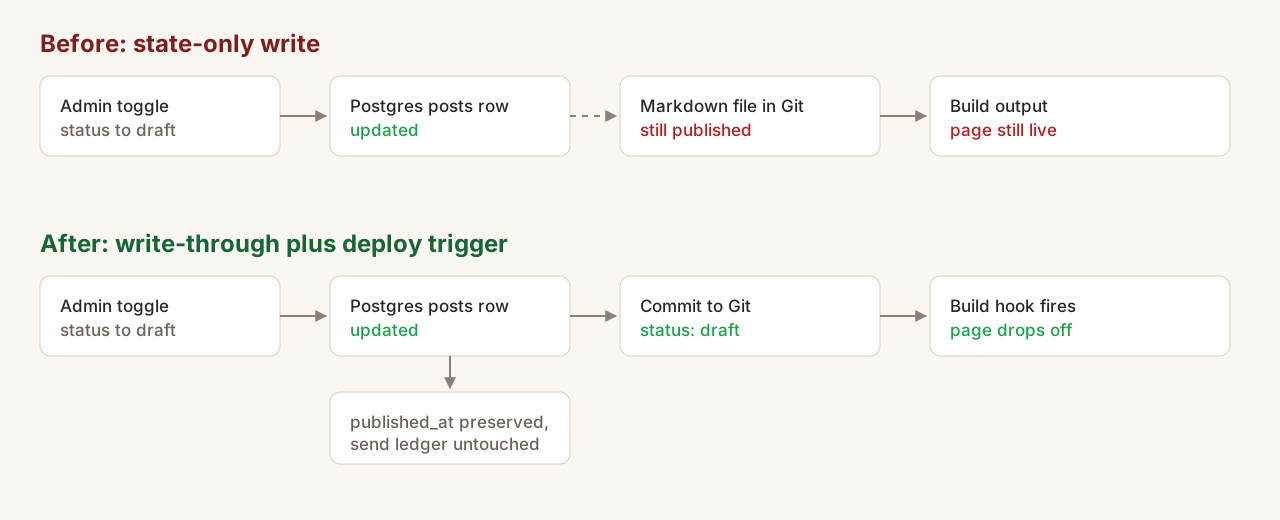
The fix has three parts, and only the first one is obvious.
Write through to the source of truth. The toggle now commits the changed frontmatter to the article’s file in Git, the same path publishing already used. The database write and the file write happen together, so the thing that renders the site learns about the change.
Fire the build. A commit does not rebuild anything on its own, so unpublishing was still a two step move: click the toggle, then go publish. The toggle now POSTs to a build hook straight after the commit succeeds, and the admin reports back whether the build was triggered, skipped because no hook is configured, or refused. One click, gone in about a minute.
Protect the two pieces of state that must not move. published_at is written once, on the first ever publish, and left alone on every flip after that, so pulling a post back and putting it up again does not make it look new. And the newsletter guard was checking post status, which is wrong: a republished post has the same status as a first publish. It now checks the send ledger by slug, so if the slug was ever mailed, in any state, it will not be mailed again.
One landmine turned up while fixing this. Twelve of the older imported posts had an empty body in the database, because they were only ever backfilled as rows. Committing on a toggle would have written that empty body straight over the real article file. Those rows now refuse to commit and the admin tells me to run “pull from GitHub” first, which is a lot better than a silent overwrite of a post I wrote four years ago.
The underlying lesson is one I already knew and wrote down earlier in this post: decide the direction of truth. I did decide it. Git owns the words, Postgres owns the state. Status is state, which is why the toggle only wrote to Postgres, and it was also a word in a file, which is why that was wrong. When a field lives in both places, the write has to reach both, every time, or the one you did not write to will eventually be the one somebody reads.
The deploy failures
Three of these ate an evening each and all three were version or config drift.
The first: the site published successfully and then served “files are missing”. .nvmrc was pinned to Node 18 and Astro wanted 20 or higher, so the build failed in a way the publish step did not notice. Later Astro wanted 22.12.0 and it happened again, this time across .nvmrc, the host config and package.json engines, which all had to agree.
The second: a Cloudflare build failing on npm ci. I had added @supabase/supabase-js to package.json but the lockfile never got the new dependency tree, and npm ci refuses to guess. Locally npm install had papered over it.
The third: creating my own admin account. I got the confirmation email, clicked it, and landed on otp_expired. An email scanner had followed the link before I did and consumed the one-time token. The account existed the whole time.
Before and after
The old site is still up at archive.tonycletus.com, which makes the comparison easy to run rather than assert. Same tool, same desktop profile, two URLs.
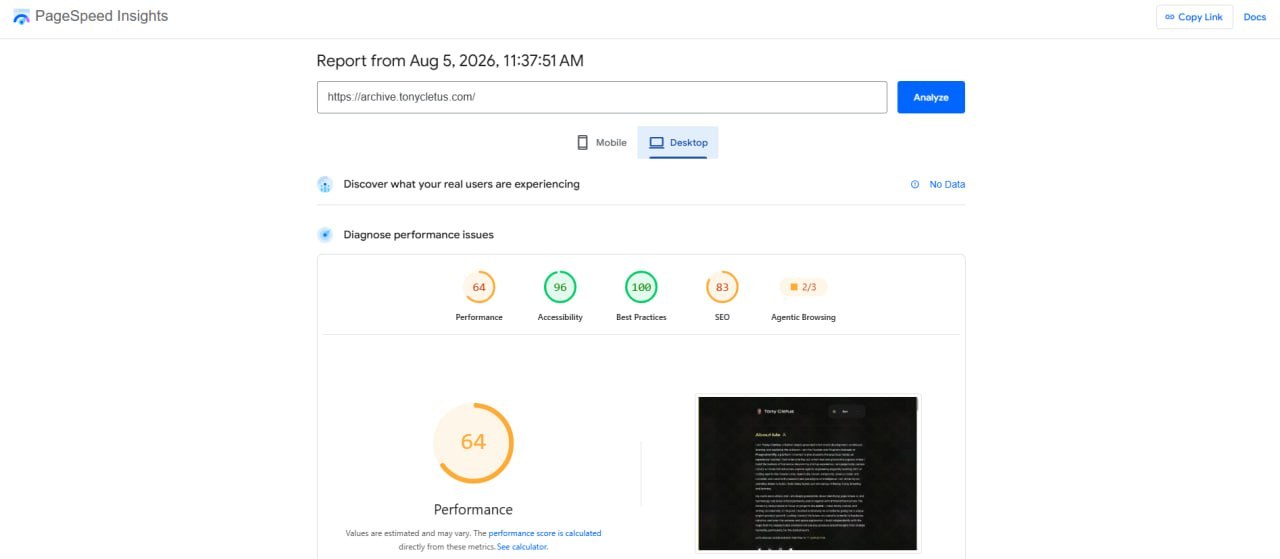
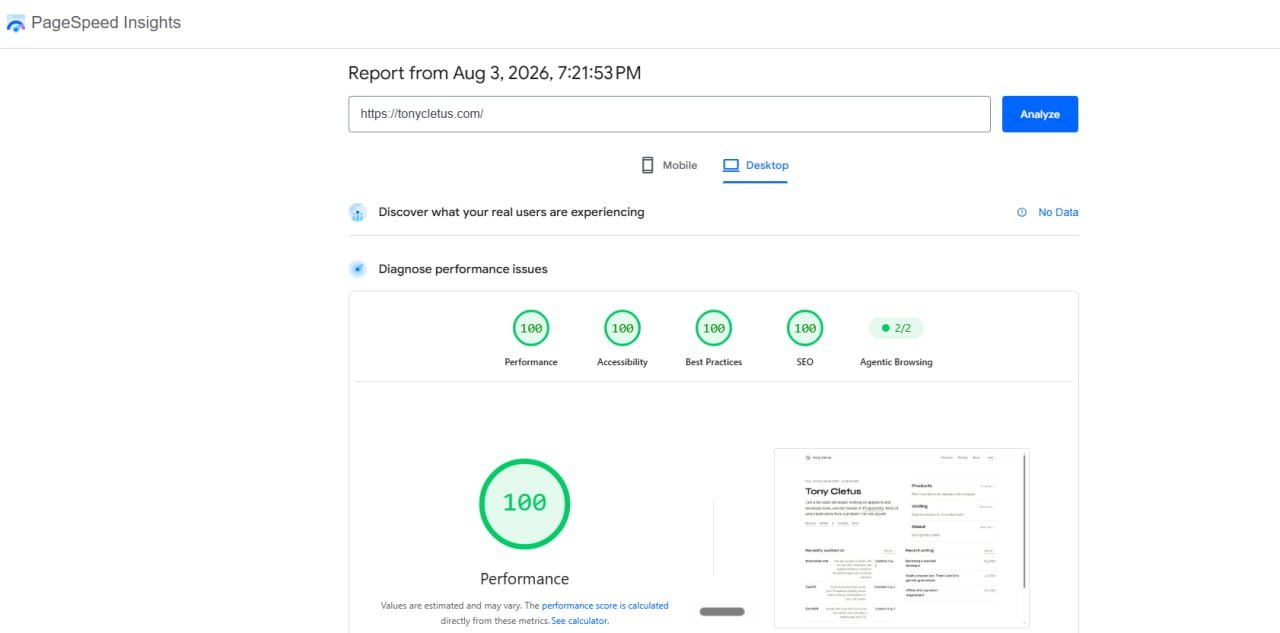
Performance went from 64 to 100 and SEO from 83 to 100. Most of that is not clever work. It is the SPA bundle disappearing, the templates becoming files, and the head tags finally being generated per page instead of copied by hand. Accessibility moved 96 to 100 on the back of a separate audit pass, which was the only one of the four that took deliberate effort.
What it cost
Roughly 600 lines across the edge functions, plus the admin page, plus a few evenings that turned into a few weeks once the security pass started. The ongoing cost is that rate limiting, auth, subscriber privacy and my own CSP are now my problem, and none of those would have occurred to me while paying someone else.
The trade is real and it is not obviously right for everyone. If you publish weekly and want to think about writing, pay for the three services. I built this because the manual steps between them were already costing me posts, and because I wanted reading numbers instead of traffic numbers.
What I would do differently
Three things, if I started again on Monday.
Write the ledger first. Every bug in the newsletter came from state that existed in one place and not the other. The dedupe table, the send status and the dead letter list all arrived after a failure taught me I needed them. They are cheap to add on day one and expensive to add on day forty.
Decide the direction of truth before writing any UI. Git owns words, Postgres owns state. Once that sentence existed the CMS almost wrote itself, and every hour I lost before it existed went into syncing two copies of the same article.
Deploy the boring parts before the interesting ones. The analytics were written for a week before I noticed they were never deployed. A pipeline that runs end to end with a stub in it beats a perfect component that nothing calls.
What is next
The analytics are recording but the sample is small, so the interesting questions are still open. The first one I want answered is whether the read to end rate holds as an article gets longer, or whether there is a length where people quietly stop. I have a guess. I would rather have the data.
The stack is on tonycletus.com if you want the shape of it.
Get new pieces by email
I write about building products, applied AI, and the work behind them. No schedule, no spam, one email when something new goes up.