research-log
Offline AI is a product requirement
Working notes from AANI on small models, degraded networks, and why offline support belongs in the requirements instead of the backlog.
Almost every AI product I use assumes four things at once: a fast connection, cheap data, a recent device, and a user willing to wait a few seconds for a cloud response. Break any one of those and the interface usually does the same thing, which is spin and then fail.
That is the starting point for AANI, the research project where I keep testing this. The question I care about is not whether a model can answer. It is whether the system still helps when the network drops halfway through the answer.
What “offline” actually has to cover
Offline is not one state. When I started writing down the cases, there were at least five, and each needs a different product answer.
- Fast and cheap. The normal case every product is built for. Use the cloud model.
- Slow but present. The request completes, eventually. Streaming matters more than model quality here, because a partial answer arriving in two seconds beats a better answer arriving in twenty.
- Intermittent. The connection comes and goes mid-session. This one breaks the most code, because a request can succeed, then the follow-up fails, and the app has no idea which half of the conversation the server kept.
- Metered. The connection works and the user does not want to spend on it. A product that silently burns data on a large context window is making a spending decision for someone else.
- Absent. No network. The device has to answer from what it already holds, or say clearly that it cannot.
Most products collapse all five into “online” and “error.”
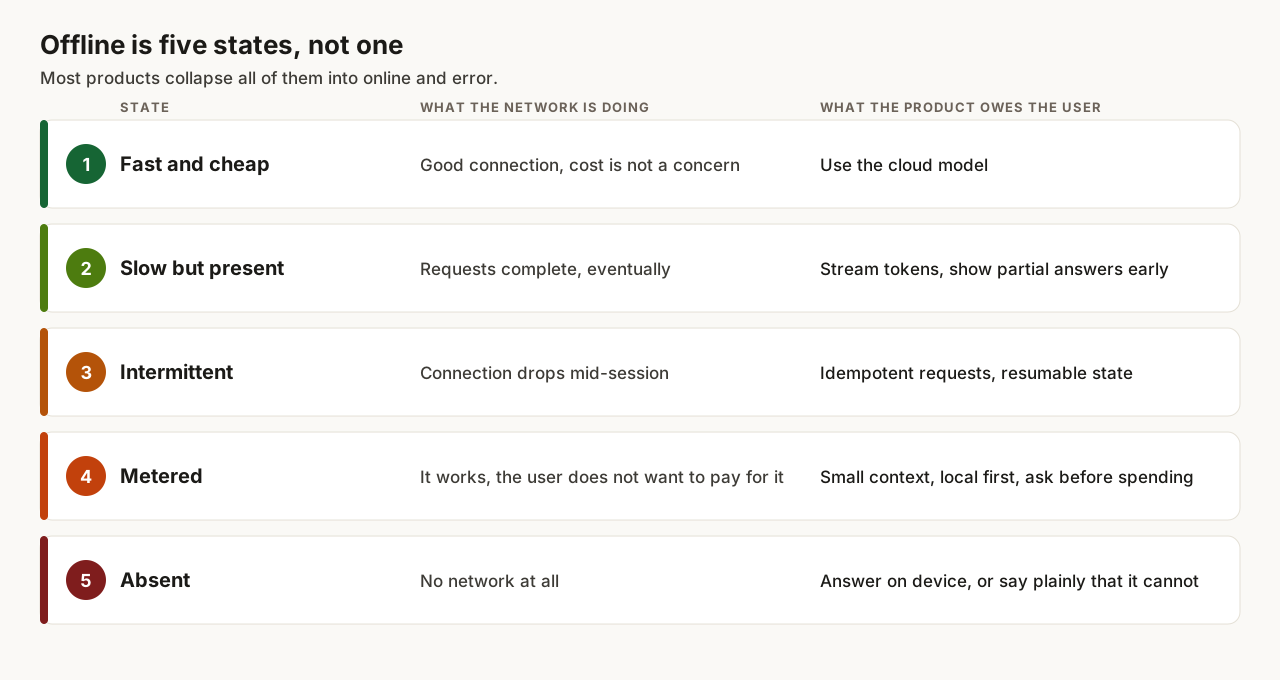
The middle three are where the work is. One and five are easy to write code for because the answer is unambiguous. Two, three and four are the states where the app has to make a judgment call on the user’s behalf, and where most products quietly guess wrong.
The models that make this possible now
This stopped being theoretical around the time the small open models got genuinely usable. The ones I keep coming back to:
- Gemma 3 1B and 4B from Google. The 1B is the one I reach for first on a mid-range Android phone, since quantised it lands in the few-hundred-megabyte range and still handles extraction and classification.
- Llama 3.2 1B and 3B. Meta built these specifically for on-device summarisation and instruction following, and the 3B is the point where output stops feeling like a toy.
- Qwen2.5 and Qwen3 at 0.5B to 3B. The 0.5B is small enough to be interesting for pure structured output, and the family is unusually good at following a JSON schema for its size.
- Mistral 7B, still the one I compare everything else against. At 4-bit it is around 4 GB, which rules out most phones and rules in almost any laptop, and it is the smallest model where I stop noticing that I am talking to a small model. Its Apache-2.0 licence also means nobody has to ask permission to ship it.
- Ministral 3B and 8B, Mistral’s on-device line. The 3B is the interesting one, because it sits in the same size class as Llama 3.2 3B while being built for edge inference and function calling, which is most of what I want a local model to do.
- Phi-3.5-mini at 3.8B. Trained heavily on reasoning-style data, so it punches above its parameter count on anything that looks like a short logic step.
- SmolLM2 at 135M to 1.7B. Genuinely tiny. Not a chat model in any satisfying sense, but fine for routing and tagging.
- Whisper tiny and base, plus faster-whisper, for speech. Voice input matters more than text input for a lot of the users I have in mind, and this runs locally.
The number that decides all of this is not the benchmark score, it is the file size after quantisation.
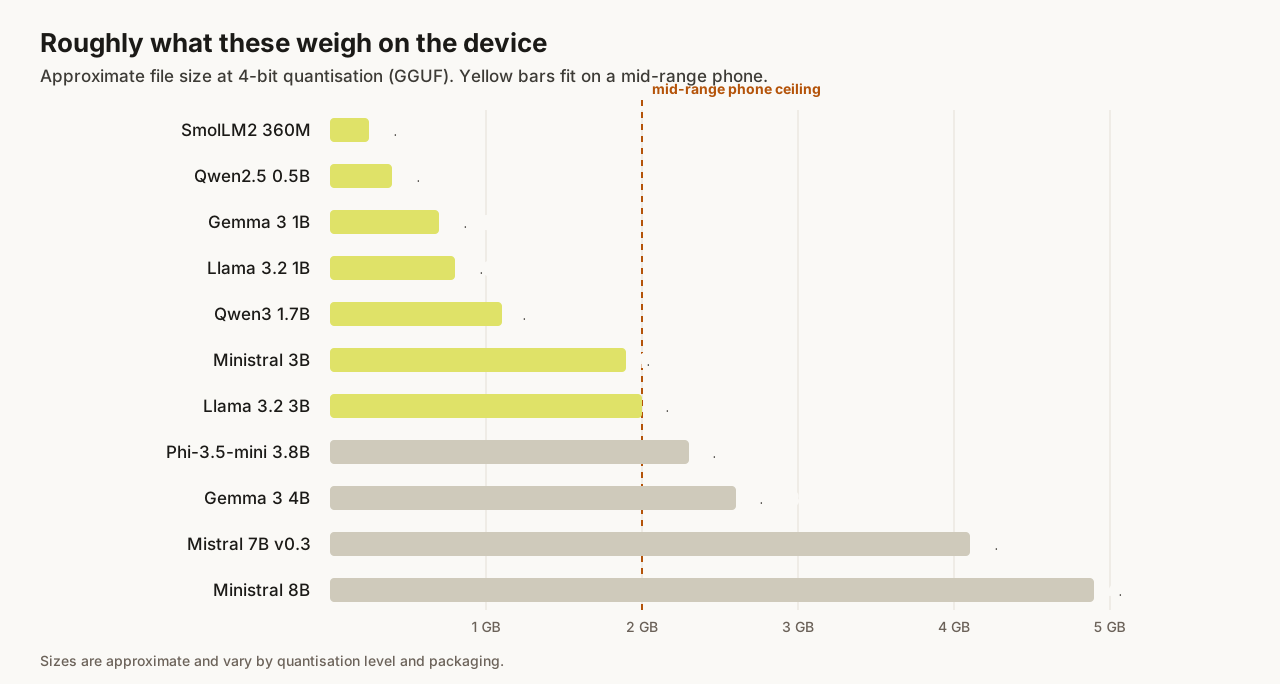
The runtimes matter as much as the weights. llama.cpp with GGUF quantisation is the workhorse, Ollama wraps it for desktop, MLC and ExecuTorch handle mobile, and transformers.js with WebGPU puts a small model inside the browser with no install at all. Quantisation is what makes the arithmetic work: a 3B model at 4-bit sits around 2 GB, which is the difference between shipping and not.
Download size is a product decision too. A 2 GB download on a metered connection is a bill, so the honest version asks first, resumes if it drops, and works in a reduced form until the weights land.
Heat and battery are the other limits nobody puts on a model card. On a cheap Android phone a 3B model answers fine once, and by the fifth answer the device is warm and the tokens have slowed down. I now test on the worst phone I own rather than the best one, because that is the machine setting the ceiling.
Where small models earn their place
A small model running on the device is not a worse version of a frontier model. It is a different component with a different job. It handles structure well: pulling fields out of text, classifying a request, drafting something short, answering from a local document set. Those are the tasks where a few billion parameters is enough and where the latency win is large, because there is no round trip at all.
Concretely, the jobs I hand to a local model are extracting a date and an amount from a message, deciding whether a question needs the cloud at all, tagging a note, and answering from a small set of documents already on the device. The jobs I do not hand to it are long open-ended writing, anything needing current information, and multi-step reasoning across a large context.
The tasks it does not handle well are the open-ended ones, and that is fine, because those are the ones worth spending a network request on. The design work is deciding which is which before the user hits send, not after.
The pattern I keep coming back to
Route by capability, not by connectivity. Decide what class of task the request is, then pick the cheapest place that can do it. Local first when local is sufficient, cloud when the task needs it and the network allows it, queued when the network cannot.
Queuing is the part I underestimated. If a request is deferred, the user needs to know it was deferred, needs to keep using the app, and needs the answer to arrive somewhere they will find it later. That is closer to how email works than how chat works, and it changes the interface more than the model choice does.
SMS sits at the far end of this. It is slow, it is text only, and it works on hardware that will never run a local model. Designing a flow that fits in a few messages forces a level of clarity that helps the rich version too.
The routing decision needs an owner in the interface as well. When a request is answered on the device, I say so, because the answer is cheaper, faster and slightly worse, and a user who knows that will ask again with the cloud when it matters. Hiding which model answered is how you lose trust the first time the local one gets something wrong.
Why this is a requirement and not a nice to have
If offline is treated as a fallback, it gets built last, tested least, and shipped broken. It ends up as an error screen with a retry button.
If it is treated as a requirement, it changes the architecture on day one: what gets stored locally, how state syncs, what a request costs, what the app is allowed to promise. Those are not decisions you retrofit.
The test I use now is simple. Turn the network off in the middle of a session and see what the product does. If the answer is nothing useful, the product only works in the conditions it was demoed in.
Get new pieces by email
I write about building products, applied AI, and the work behind them. No schedule, no spam, one email when something new goes up.